
How it helps your club
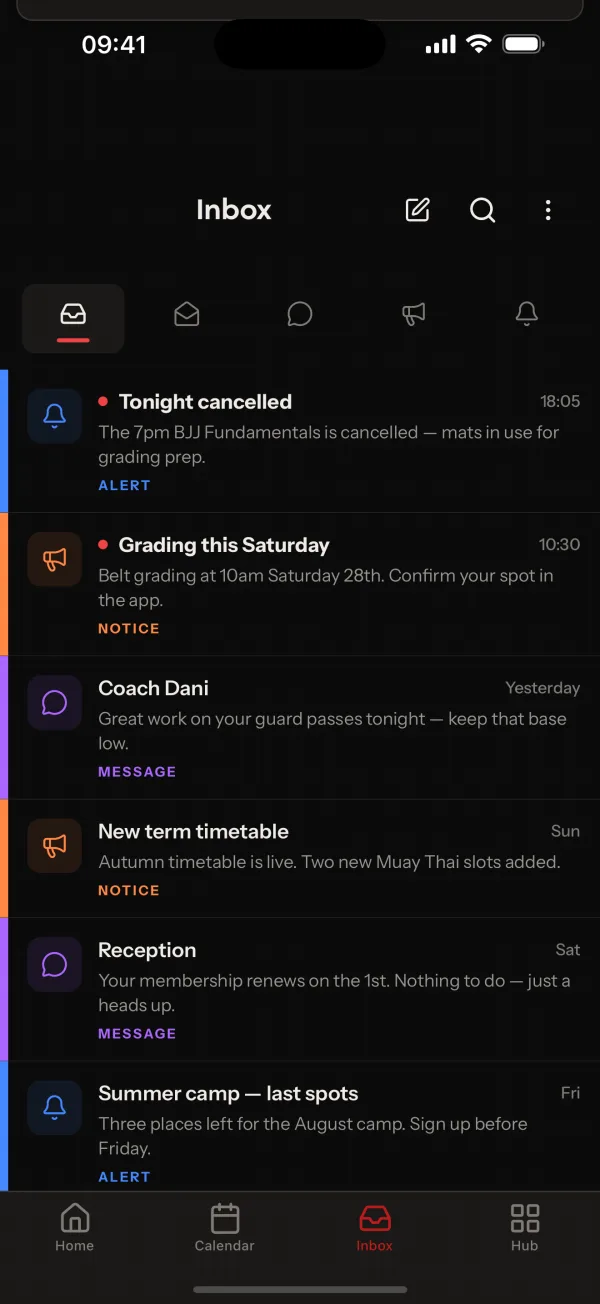
Club notices give you one place for the news that matters, such as a cancelled class, a new term or a change of venue. It is easier to find than a message in a group chat, and nobody has to scroll back for it.
How it works
Admins and coaches write a notice on the web dashboard or in the app. Members see it on Home, under the Notices filter in their Inbox and in the Notices list.
OurClub also shows announcements from the platform in the Inbox, separate from your club's own notices.
Common questions
- Where do members see a notice?
- On the Home screen, under the Notices filter in the Inbox, and in a dedicated Notices list in the app.
- Who can post a notice?
- Admins and coaches, from the web dashboard or the app.
- Is a notice different from an announcement?
- Yes. Notices are your club's own. Announcements come from OurClub and appear in the Inbox separately.
Related features
- Education CentreA club library of YouTube videos, PDFs, documents and images, in categories and playlists.
- Community FeedA club-only feed where members post and comment, with locking and reporting built in.
- Round TimerA round timer in the app with rounds, chained blocks, saved presets and sound cues, for coaches and members.
Setting it up for your club is covered in the help centre.
