
How it helps your club
Class attendance check-in gives you a register you can trust without a coach holding a clipboard. You know who came, and so do your reports.
How it works
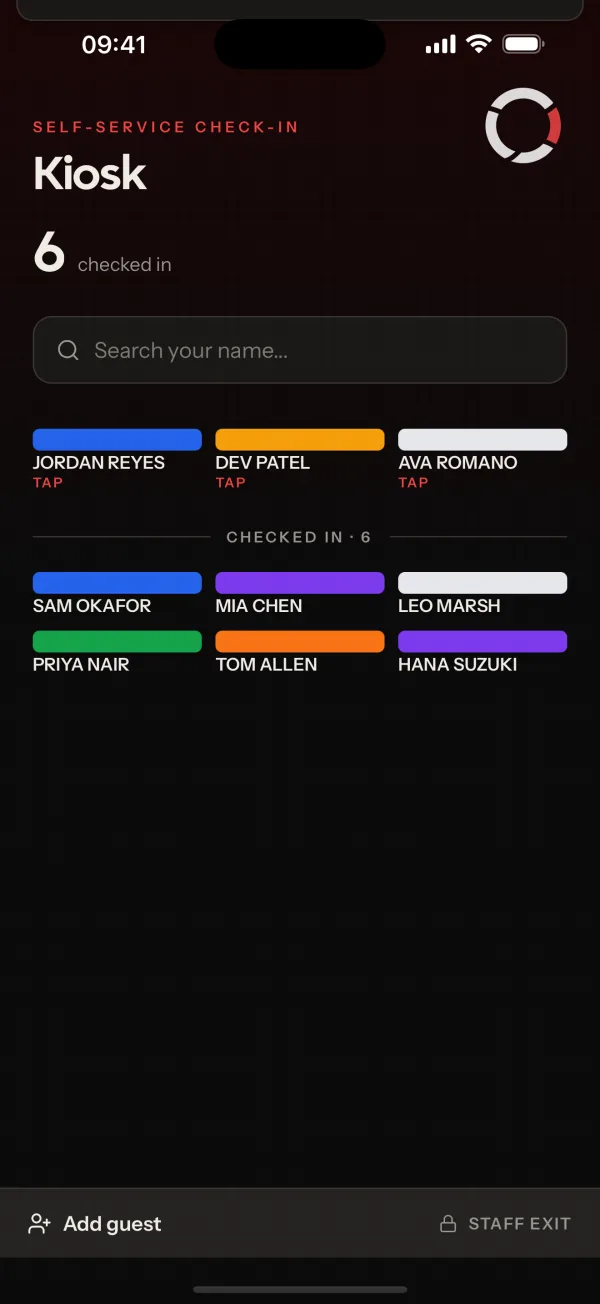
Open the kiosk for a class on a tablet at the door. Members check in as they arrive, and guests can be added on the spot. Leaving the kiosk needs a code.
Members can also check themselves in from the app. That works from 15 minutes before the class starts to 15 minutes after.
Common questions
- Can members check themselves in?
- Yes, from the app, with the I'm here button. It works from 15 minutes before a class starts until 15 minutes after.
- Can I check in a guest?
- Yes. The kiosk supports guest check-in.
- Can members change the kiosk screen?
- No. Leaving the kiosk needs a code, so only staff can close it.
Related features
- Mobile AppOne app for members, parents and coaches to see classes, book places, read notices and get push notifications.
- ReportingRun club reports as PDF, CSV or Excel, and schedule them to repeat daily, weekly, fortnightly or monthly.
- Class RemindersRemind booked members, or their parents, about an upcoming class so fewer people forget to turn up.
Setting it up for your club is covered in the help centre.
